

Key Facts at a Glance
- Googlebook is Google's new AI-focused laptop platform, built around Aluminium OS and a productivity pitch tied to the Google ecosystem.
- Its standout AI features include desktop widgets, Gemini-assisted widget creation, Magic Pointer screen recognition, Rambler voice dictation, and AI-generated file descriptions.
- Googlebook cross-device features require an Android 17 phone, a stricter requirement than Windows Phone Link, which asks only for Android 10 and supports photos, calls, messages, and some app streaming.
- Hands-on testing found that the Android Outlook app on Googlebook required repeated reauthentication and crashed, while Windows handled the same account more smoothly.
- Widgets are more useful on Googlebook than on Windows, but Gemini widget creation is still limited and Magic Pointer can be slow.
- Rambler dictation is a clear strength, handling filler words, punctuation, and sentence breaks well; repurposing Caps Lock as a shortcut is useful.
- A Lenovo Googlebook 15 test unit had a poor keyboard, choppy performance with 16GB of memory, and no easy way to track battery life.
- Despite clever individual features, Windows remains stronger as a cohesive productivity laptop for app compatibility, hardware maturity, multi-display work, and familiar controls.
A New Productivity Bet From Google
The first Googlebooks are arriving with a simple promise: productivity inside the Google ecosystem, with artificial intelligence woven into the core experience. That pitch is ambitious. The modern laptop market is crowded with mature Windows machines, Apple laptops, and Chromebooks that already handle everyday work. A new platform has to justify not only its hardware but also a new operating system, a new set of app behaviors, and a new set of habits. Googlebook tries to answer that challenge with AI features that are meant to feel native rather than bolted on.
The platform runs Aluminium OS, which represents the next evolutionary step for Chromebook-style devices. The hardware is not the main story. The main story is how Google wants people to interact with their files, their phones, their messages, and their voice. In practice, the results are mixed. Some features show genuine thought about how AI can reduce friction. Others reveal how much basic platform work remains before a Googlebook can replace a familiar Windows laptop for demanding productivity tasks.
The Phone Requirement Changes the Equation
One of the most important productivity features on a Googlebook is its connection to an Android phone. The technology is meant to tie messages, calls, photos, and apps together across devices. The catch is steep: Googlebook requires an Android 17 phone. That requirement narrows the pool of compatible devices and creates a strange situation in which a newer laptop platform can be less flexible than an older desktop operating system.
Windows offers a useful comparison. Phone Link, once known as Your Phone, connects an Android phone to a Windows PC and requires only Android 10. It can transfer photos, place calls, send messages over Bluetooth, and even run Android phone apps inside PC windows. The experience is not always perfect, and Windows can be selective about which phones support app streaming. Even so, the lower Android requirement makes Windows more accessible to people who keep phones for several years or who use models that do not receive the fastest operating system updates.
The phone requirement is not just a technical detail. It affects the core productivity promise. A laptop that asks users to buy or upgrade a phone before its best cross-device features work is asking for a larger commitment than many people expect from a computer. For a student, a freelancer, or an office worker with a two-year-old handset, that requirement could be a deal breaker before the AI features even get a chance to prove themselves.
Apps, Accounts, and Friction
App compatibility is another area where the Googlebook’s productivity story runs into trouble. Windows has decades of desktop software, mature account management, and predictable behavior for tools such as Outlook. On the Googlebook, Outlook runs as an Android app. In testing, that version took a long time to set up a work account, demanded reauthentication at every login, and eventually crashed.
That kind of friction matters more than a flashy demo. Productivity is often defined by what happens between tasks: logging in, switching accounts, finding files, and moving between apps without losing context. Windows handles those transitions with Windows Hello, password protection, and desktop applications that remain open and ready. The Lenovo Googlebook test unit did include face and fingerprint login in front of an optional PIN, which is a welcome hardware convenience. But the software experience around accounts still felt less settled than the Windows alternative.
The issue is not that Android apps are useless on a laptop. The issue is that a productivity platform needs to make common work tools feel native, reliable, and predictable. When a core app such as Outlook stumbles, users begin to wonder what else will break under deadline pressure. That uncertainty is difficult to overcome with clever AI features alone.
Widgets and AI Assistance
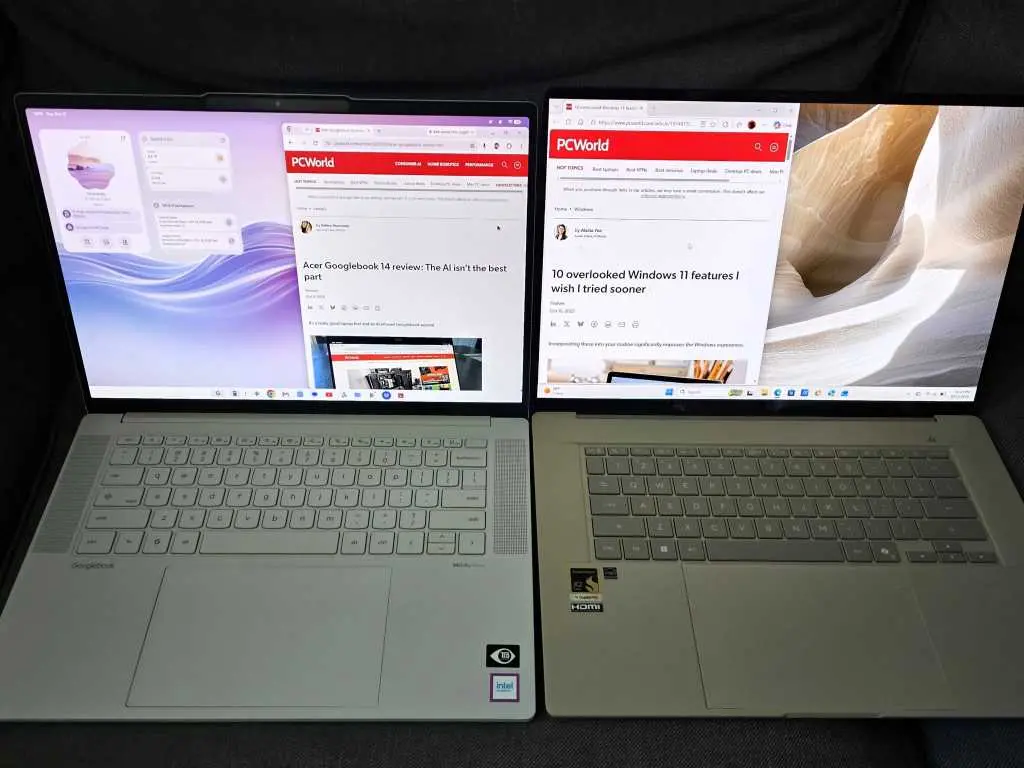
Googlebook does have an advantage in desktop widgets. On Windows, widgets often feel like a distraction confined to a panel or a corner of the screen. On Googlebook, widgets live on the desktop, where users can create and modify them to display information that matters. A screen-time widget, for example, can show useful context at a glance. The approach makes the desktop feel more like a personal dashboard and less like a static wallpaper.
Gemini adds another layer. Users can ask the assistant to create a widget instead of choosing every element by hand. The idea is strong, but the execution is still uneven. A request for an up-to-the-minute widget tracking baseball playoffs returned only scores. A request for a widget highlighting priority email was rejected because direct email access was not built in. These are early limitations, not fatal flaws, but they show that AI-generated interfaces still need reliable data connections and clear boundaries.
Screen recognition is similarly promising and similarly unfinished. Magic Pointer launches a context-aware Gemini experience when the user wiggles the mouse pointer, then highlights and interprets what the pointer is aimed at. Copilot Vision on Windows takes a different approach by watching the screen once enabled. Each has flaws. Copilot Vision was relatively poor at identifying what it could see. Magic Pointer took close to a full minute using its own Flash-Lite engine. A minute is too long for a feature that is supposed to reduce friction. Speed will be essential if these tools are to become daily habits rather than occasional demonstrations.
Dictation and Shortcuts
The clearest win for Googlebook is Rambler, its voice dictation system. Windows has dictation across the platform and a dedicated function in Word, but the Windows 11 version is fairly literal. Rambler is more forgiving. It accommodates filler words such as um, er, and you know, then smooths them out. It also inserted punctuation, broke up sentences, and applied proper punctuation during testing. That is AI applied to a real workflow rather than AI added as a spectacle.
Google also repurposed Caps Lock as a shortcut for small utilities, including Rambler. The choice is clever because most people rarely use Caps Lock for its original purpose. Packing useful functions into a single key press can make AI features easier to reach without memorizing a long list of keyboard combinations. The limitation is consistency. The Caps Lock shortcut worked in some scenarios, such as Gmail, but not in others. That inconsistency undermines the benefit. A shortcut only becomes invisible and useful when it works everywhere the user expects it to work.
File search shows a similar pattern of ambition and uncertainty. The Googlebook demonstrated a way to apply AI to search within the Files app, promising to append AI descriptions to files without renaming them. The feature did not appear again during testing. More importantly, users care less about how an AI describes a file than whether they can find it quickly. Windows 11’s semantic search and recent changes to the Search function seem just as promising, if not more so, because they build on an existing file system and familiar search habits.
Hardware and Performance
The hardware story is not the main focus, but it still matters. A Lenovo Googlebook 15 test unit had an uncharacteristically poor keyboard. That is a serious problem for a productivity laptop. Writers, analysts, coders, and students spend hours typing. A weak keyboard can erase the value of a clever software feature. The unit also felt choppy and laggy with 16GB of memory, even when running a few apps and Chrome tabs across two displays. Battery life was difficult to track because there was no great way to monitor it.
These issues do not prove that every Googlebook will feel slow. They do show that the first generation has to be judged as a complete product, not as a collection of AI demos. A laptop is a physical tool used for hours at a time. Keyboard quality, display behavior, memory management, battery reporting, and thermal performance all shape the experience. When those basics are weak, AI features cannot compensate.
What the Comparison Reveals
The comparison between Googlebook and Windows is not a simple contest between old and new. Googlebook has genuine ideas. Desktop widgets, Rambler dictation, and the Caps Lock shortcut all point toward a future in which AI reduces small frictions throughout the day. The problem is cohesion. Windows is full of different ways to perform the same task because it meets users halfway. It supports older phones, mature desktop apps, familiar account security, and a wide range of hardware. Googlebook is still teaching users a new system, and some of its most important features depend on conditions that many people cannot meet.
That is why the initial verdict leans toward Windows for most productivity buyers. A Windows laptop may not have the same AI-first sheen, but it is more likely to keep Outlook open, connect to an older Android phone, and provide a reliable keyboard for a full workday. Googlebook’s individual features are smart enough to watch. They are not yet strong enough to displace a mature platform. For now, the Googlebook remains a promising but unfinished productivity experiment, while Windows retains the advantage in cohesion, familiarity, and hardware maturity.
Source: PCWorld News