

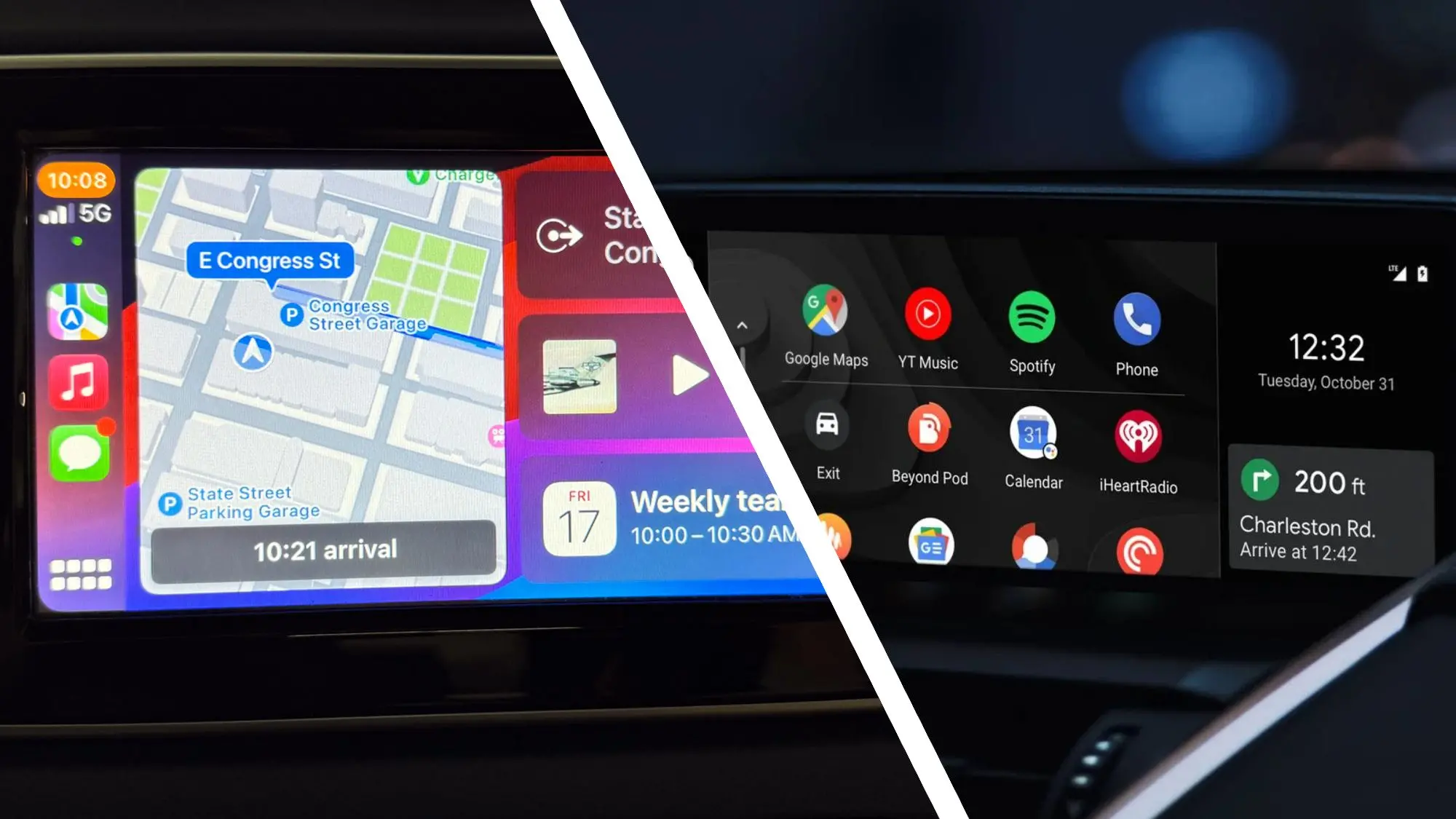
For years, smartphone projection systems have promised to make driving safer, easier, and more enjoyable. But only two names matter: Android Auto and Apple CarPlay. Both are now standard on nearly every new car, yet they remain surprisingly different. To settle the debate for myself, I logged 250 miles on mixed highways, city streets, and country roads, switching between both systems in the same vehicle. I tested navigation, phone calls, music, messaging, and voice commands. By the end, I knew exactly which one I would choose.
Why 250 Miles?
Short test drives are fine for checking basic features, but a serious comparison needs serious time. Over 250 miles, I encountered traffic jams, construction zones, confusing interchanges, and long stretches of open road. That gave me enough opportunities to see how each system handled routing updates, voice recognition, and reliability under pressure. I also wanted to experience both systems during lengthy sessions, since glitches often appear after 20 or 30 minutes of constant use.
I used the same car for the entire test, so any difference came down to the software, not the hardware. The vehicle had a 10-inch touchscreen, physical volume knobs, and wireless connection support for both standards. I used an iPhone 13 for CarPlay and a Samsung Galaxy S22 for Android Auto. Both phones were fully charged and had the latest versions of their operating systems and apps.
Setting Up Each System
First impressions matter, and both systems made very different ones. Apple CarPlay connected almost instantly over Wi-Fi and Bluetooth. The home screen appeared with a clean grid of familiar icons. Android Auto took a few extra seconds to connect, and the interface looked more streamlined but also more utilitarian. CarPlay is all about simplicity; Android Auto is about glanceable information.
In terms of initial configuration, both were quite easy. Android Auto asked me to agree to a driving safety notice and then immediately showed a map that filled the entire screen. CarPlay also displayed the map, but with a dock on the left for frequently used apps. If you are someone who just wants to get moving, either system works fine. But if you value visual polish, CarPlay has the edge from the start.
Navigation: The Most Important Feature
Navigation is the heart of any car phone integration system. I used Google Maps on both platforms because that is my preferred app, but I also tested Apple Maps on CarPlay and Waze on both. The routing was similar in most cases, but there were critical differences in how directions were presented.
Google Maps on Android Auto felt more stable. The map rendered quickly, zooming in and out smoothly as I changed speed. Turn-by-turn prompts were clear and well-timed. The banner at the top showed the upcoming turn, lane guidance, and a countdown to the maneuver. On CarPlay, Google Maps also worked perfectly, but the layout felt slightly less integrated. The map occupied less vertical space because CarPlay reserves room for its persistent status bar and bottom dock.
Apple Maps on CarPlay was the biggest surprise. It performed impeccably, with rich 3D landmarks and very intuitive lane guidance. The spoken directions were natural and gave advance warning about complex interchanges. However, Apple Maps on Android Auto is unavailable, so that advantage only exists for iPhone users.
Waze on both systems offered the same features, including crowd-sourced hazards and speed trap alerts. I noticed that Waze on Android Auto allowed me to view the full map edge-to-edge, while on CarPlay the bottom part of the screen was occupied by the app dock. That small difference gave Android Auto a slight visual benefit.
Voice Assistants: Siri vs Google Assistant
Voice control is where these two systems diverge most significantly. Siri and Google Assistant have very different personalities. I spent an entire morning using only voice commands to set destinations, send messages, change music, and adjust settings.
Google Assistant on Android Auto is exceptionally good at understanding natural language. I said, “Take me to the nearest gas station with a 4-star rating,” and it instantly pulled up a list of options. I spoke a full text message with punctuation and emojis, and it transcribed everything accurately. Google Assistant also handled follow-up questions gracefully. If I asked, “How long will it take?” after requesting a route, it knew exactly what I meant.
Siri on CarPlay is more limited and often requires more explicit phrasing. I had to say “Hey Siri, get directions to the nearest gas station” and then separately ask to filter by rating. Siri also misunderstood a few names that Google got right. That said, Siri's voice is more pleasant and friendly, and it integrates more deeply with iPhone-specific features like Reminders and Calendar. If you live in the Apple ecosystem, Siri’s limitations might be acceptable. But for raw voice recognition, Google wins.
Phone Calls and Messaging
Both systems make phone calls through the car's speakers and microphone, and neither had obvious audio quality issues. Callers told me my voice sounded clear and natural on both platforms. Android Auto displays a contact list that is easy to scroll through while parked, and the recent calls section is just one touch away. CarPlay also does this well, and the large touch targets are easy to hit while driving.
Messaging is where things got interesting. Android Auto can read incoming messages aloud and let you reply by voice. I dictated a few text replies to a friend, and Google Assistant transcribed them perfectly. The system showed the conversation thread on screen so I had context. CarPlay also reads messages and offers suggested replies, but the hands-free experience felt a little more cumbersome. I had to say “Siri, reply” after hearing the message, and then speak my response. It worked, but it was not as seamless as Android Auto's continuous interaction.
One thing I appreciated about CarPlay was its handling of incoming calls. A banner appeared at the top without interrupting the map, and I could answer or decline with a single tap. Android Auto displayed a similar alert, but it took over the entire screen. Both are safe, but CarPlay's approach is less jarring.
Music and Audio Apps
I listen to a lot of podcasts and music, so I tested Spotify, Apple Music, and Audible on both systems. The basic playback controls are identical, but the browsing experience differs. CarPlay shows a larger album artwork and a dedicated “Now Playing” screen that is gorgeous. Android Auto includes a media card at the corner of the map, which is great for keeping navigation in sight.
Spotify worked equally well on both. I could access my playlists, like songs, and adjust the queue. Apple Music is obviously better integrated into CarPlay. It shows the full album list, the artist library, and even lets you start a personalized radio station with a single tap. On Android Auto, Apple Music is not available, so I could not test it there. But I did test YouTube Music on Android Auto, and it was just as good as Spotify.
Audible was a surprise. It worked on both systems, but the interface on CarPlay was easier to scroll through chapters. Android Auto showed the audiobook player in the media card, which made it easy to switch between navigation and the book. Overall, music fans will be happy with either system, but CarPlay has a slight edge if you use Apple Music.
Customization and Home Screen
Android Auto is all about customization. You can rearrange app icons on the launcher, change the default navigation app, and even choose between different map layouts. Google Assistant settings can be tweaked to change voice responses and privacy options. CarPlay, on the other hand, offers limited customization. You can reorder apps and choose a dark or light appearance, but you cannot change the fundamental layout or replace Siri with another assistant.
The CarPlay home screen shows a grid of every installed compatible app. That can become cluttered if you have many apps. Android Auto shows only your most-used apps on a row and hides the rest in an app list. I found Android Auto's approach cleaner and less distracting.
However, CarPlay has a neat feature called “Now Playing” that appears as a large widget when media is playing. Android Auto also has a progress bar, but it is tucked into the corner. I prefer CarPlay's larger touch target when I need to skip a track quickly.
Connection Stability and Reliability
Over 250 miles, I experienced only one significant disconnect. That happened with Android Auto, when the phone briefly lost Wi-Fi and the system hung for about 10 seconds before reconnecting. During that time, navigation continued on the car's screen, but I lost the media interface. CarPlay did not drop once during my entire test. That might be due to my specific phone or car, but it is worth noting.
I also noticed that Android Auto sometimes lagged when I plugged in the phone via USB. The system took about 20 seconds to wake up. CarPlay was nearly instant. On a long road trip, that small delay can feel like an eternity when you just want to start the engine and go.
The Verdict: Which One I'm Sticking With
After all those miles, the choice became clear. I am sticking with Android Auto.
Despite the one disconnect and slightly slower startup, Android Auto won me over with its superior Google Assistant voice control, more flexible navigation interface, and better use of the widescreen display. Google Maps has been my go-to for years, and seeing it at full size without a persistent dock taking up space makes a huge difference. Waze also looks better on Android Auto, and I can easily switch between mapping apps, which CarPlay does not allow if you are using Apple Maps as the default.
CarPlay is not a bad system. In fact, it is more polished and visually appealing. If I were deeply invested in the Apple ecosystem, especially with Apple Music and heavy use of iMessage, I might choose CarPlay. But for someone who relies on Google Maps and natural voice commands, Android Auto is the better assistant on the road. The 250-mile test proved that to me beyond any doubt.
Both systems are constantly evolving. Android Auto will likely get more personalization features, while CarPlay continues to gain deeper car-integration capabilities, especially with the next-generation CarPlay that controls gauges and climate. For now, though, I know which one will be guiding me on my future trips.
Source: TechRadar News