

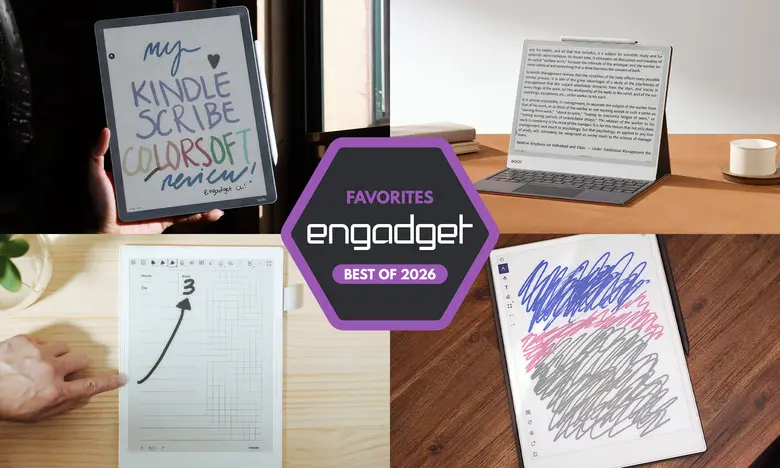
E Ink tablets have evolved significantly in recent years, offering a unique blend of paper-like writing and the convenience of digital organization. For those who love the tactile feel of pen on paper but want the ability to store, search, and sync their notes, these devices are an appealing alternative to traditional notebooks and tablet computers. After testing nearly a dozen models, we've identified the best E Ink tablets for 2026.
Best E Ink tablets for 2026
Best E Ink tablet for most people
reMarkable 2
Screen size: 10.3-inch | Battery life: Two weeks | Network connectivity: Wi-Fi | Capacity: 8GB | Included stylus: No, extra cost | Supported file types: PDF, EPUB
The reMarkable 2 offers the best combination of features for most users. While not the most feature-packed or the most interesting writing tablet we tested, it balances usability, design, and performance exceptionally well. The tablet weighs less than one pound and features a sleek 10.3-inch monochrome digital paper display with beige bezels, making it comfortable to hold and easy to use. The writing experience is superb: the included Marker (or optional Marker Plus with a built-in eraser) is tilt- and pressure-sensitive, and we noticed almost no lag between the pen touching the screen and lines appearing. This low latency makes it feel remarkably close to writing on actual paper.
For reading, the reMarkable 2 supports PDF and EPUB files. You can transfer documents via the desktop or mobile app, or by pairing your Google Drive, Microsoft OneDrive, or Dropbox account. There's also a Chrome extension called "Read with reMarkable" that lets you send web articles directly to the tablet. We found this particularly useful for longform reading and annotating. The interface is clean and intuitive, with eight brush types, customizable line thicknesses, and the ability to convert handwritten notes to text with surprising accuracy.
The main downside is the cost. The tablet itself starts at $399 with the standard Marker, and a $3-per-month or $30-per-year reMarkable Connect subscription is required for unlimited cloud storage and cross-device syncing. However, a one-year membership is included with purchase. For a distraction-free digital notebook that's easy to love, the reMarkable 2 remains a top pick.
Pros:
- Great reading and writing experience
- Google Drive, Microsoft OneDrive and Dropbox support
- Easy to use
Cons:
- Marker costs extra
- Expensive
- Unlimited cloud storage comes with a subscription cost
Best premium E Ink tablet
reMarkable Paper Pro
Screen size: 11.8-inch | Battery life: Two weeks | Network connectivity: Wi-Fi | Capacity: 64GB | Included stylus: No, extra cost | Supported file types: PDF, EPUB
The reMarkable Paper Pro builds on everything we loved about the reMarkable 2, adding a larger 11.8-inch color display, faster performance, and a more refined design. It's slightly taller and thinner than the reMarkable 2, with grooved edges that give it a premium feel. The device is powered by a faster processor and has 2GB of RAM plus 64GB of storage, making it noticeably zippier in everyday use. Page refreshes are quicker, pen latency is only 12ms, and the new Canvas Color technology (a modified version of E Ink Gallery 3) produces around 20,000 colors. We enjoyed seeing colors blend when highlighting or sketching, and the display doesn't lag or freeze during fast writing.
Software remains streamlined and approachable, just like on the reMarkable 2. The interface encourages a distraction-free environment while still making it easy to organize notebooks, documents, and notes. The optional Connect subscription still applies, but the generous 64GB internal storage may be enough for many users. At $629, the Paper Pro is undoubtedly expensive, but for those who want a luxury E Ink experience with color and improved performance, it's the way to go.
Pros:
- Color is a welcome and useful addition
- Backlight lets you work in dark environments
- Vastly improved performance
Cons:
- Expensive
Best e-reader E Ink tablet
Amazon Kindle Scribe
Screen size: 11-inch | Battery life: Months | Network connectivity: Wi-Fi, Bluetooth | Capacity: Up to 64GB | Included stylus: Yes | Supported file types: AZW3, AZW, TXT, PDF, unprotected MOBI, PRC natively and more
The latest Kindle Scribe refines an already excellent formula. It now features a larger 11-inch display with uniform bezels, a faster processor, and an improved front light system. The writing experience is faster and more responsive than ever, and the included pen feels comfortable with stronger magnetic attachment. While you can mark up Kindle books, the experience is imperfect—circling a word often pushes the paragraph aside, but underlining and highlighting work well with a snap-to-text feature. For those heavily invested in the Kindle ecosystem, the Scribe is unbeatable. The base model costs $430 (without a front light, which we don't recommend), the recommended model with the improved front light is $500, and the Scribe Colorsoft with a color display costs $630.
The new Home page gives quick access to Quick Notes and recent titles, though Amazon's retail recommendations still appear. The AI Search feature is hit-or-miss, but students and researchers taking extensive notes may find it useful. Overall, the Kindle Scribe is the best e-reader-focused E Ink tablet.
Pros:
- Fast, smooth performance
- Low-latency writing experience
- Seamlessly integrates with Kindle books
- Premium pen included in cost
Cons:
- AI Search could use some work
- Marking up Kindle books is an inconsistent experience
Best E Ink tablet for writing and note-taking
Supernote A6 X2
Screen size: 7.8-inch | Battery life: Weeks | Network connectivity: Wi-Fi, Bluetooth | Capacity: 32GB, expandable up to 2TB with microSD card | Included stylus: No, extra cost | Supported file types: PDF, EPUB, Word, Text (.txt), PNG, JPG, Comic book archive (.cbz), FictionBook2 (.fb2) and OpenXPS (.xps)
Supernote's A6 X2 (also known as the Nomad) is a compact 7.8-inch tablet designed for dedicated writers and note-takers. Its updated FeelWrite 2 screen protector provides a smooth, scratch-resistant writing surface, and the device includes dual sidebars so both left- and right-handed users can navigate easily. The device is user-repairable with a replaceable battery and microSD card slot, visible through a clear back panel. We found it to be the most fun E Ink tablet to use, thanks to extensive customization options: you can create your own page templates, use built-in planners, and customize brushes and keywords. Handwriting recognition is excellent, and the Atelier painting app offers a surprising range of artistic tools, including brushes, markers, and spray tools with 16 levels of grayscale.
While the software is powerful, it has a learning curve and isn't as polished as Amazon's or Kobo's offerings. The Nomad starts at $329, but you'll need to buy a pen separately, adding at least $89. If you prefer a larger option, the Manta A5 X2 offers a 10.7-inch screen for $505. For those who love tinkering and want a highly customizable digital notebook, the Supernote is outstanding.
Pros:
- Excellent writing experience
- Tons of notebook customization options
- Good handwriting recognition
Cons:
- Pen comes at an added cost
- No backlight
Another color-display option
Onyx Boox Note Air4 C
Screen size: 10.3-inch | Battery life: Weeks | Network connectivity: Wi-Fi, Bluetooth | Capacity: 64GB | Included stylus: Yes | Supported file types: PDF, PPT, EPUB, TXT, DJVU, HTML, RTF, FB2, DOC, MOBI, CHM, PNG, JPG, TIFF, BMP
The Boox Note Air4 C is a color E Ink Android tablet that runs Android 13, giving access to the Google Play Store. That means you can install a wide range of reading and writing apps, including Kindle, Kobo, and more. We saw minimal latency when writing, and the notebook app offers a wealth of brush options, including colored brushes that can be customized and saved for quick switching. The tablet also supports adding shapes and web pages to notes, and you can export notes as PDFs or PNGs via email or cloud services. An AI recognition feature translates handwriting into typed text with good accuracy, though it occasionally confuses symbols like "&" for "A".
Because it's a full Android tablet, the Note Air4 C is more versatile than many competitors, but the E Ink screen doesn't offer a great video-watching experience. The tablet is also a bit less user-friendly and on the expensive side at $529 for the bundle with a stylus and folio case. Still, for those who want a flexible device that can run productivity apps while retaining the benefits of E Ink, this is a compelling choice.
Pros:
- Color E Ink display
- Runs Android 13 with access to Google Play Store
- Supports many ways to add files to the device
- Stylus included in the box
Cons:
- E Ink screen hinders it from being a good video-consumption device
- Not as user-friendly as others
- On the expensive side
A big-screen option
Onyx Boox Note Max
Screen size: 13.3-inch | Battery life: Weeks | Network connectivity: Wi-Fi, Bluetooth | Capacity: 128GB | Included stylus: Yes | Supported file types: PDF, PPT, EPUB, TXT, DJVU, HTML, RTF, FB2, DOC, MOBI, CHM, PNG, JPG, TIFF, BMP
The Boox Note Max takes the E Ink experience to a truly large scale with a 13.3-inch Carta 1300 display. It has a high 300 dpi resolution, making text and images exceptionally sharp. The device runs on Android 13 and comes with an included stylus and cover, making it a great value for those who want a massive canvas for writing, reading, and doodling. We particularly loved the Calendar Memo app, which lets you tap on any date and jot down notes, creating a digital daily log that integrates with your reading history.
At $689, the Note Max is expensive, but its screen size and performance are unmatched by most other E Ink tablets. The lack of a front light and the less intuitive software may be drawbacks for some, but for those who prefer legal-pad-sized writing surfaces and want a device that can handle PDFs, textbooks, and extensive note-taking, it's a fantastic option.
Pros:
- Sharp E Ink Carta 1300 display
- Luxe 13.3-inch screen size
- Runs Android 13 with access to the Google Play Store
- Comes with an included stylus and cover
Cons:
- No front light
- Not as user-friendly as other options
- Expensive
Honorable mention
reMarkable Paper Pro Move
Screen size: 7.3-inch | Battery life: Two weeks | Network connectivity: Wi-Fi | Capacity: 64GB | Included stylus: Yes | Supported file types: PDF, EPUB
The Paper Pro Move is a smaller, more portable version of the reMarkable Paper Pro, featuring a 7.3-inch Canvas Color display. It's built like a steno pad and can easily slip into a large pocket. The hardware is solid with ridged edges and a responsive screen, and the stylus attaches magnetically for charging and storage. Software is identical to the larger Paper Pro, with all the note-taking and organization tools you'd expect. The price is more accessible at $449 (including the standard marker), though that's still steep for a small device. Keyboard folio support is missing, so you'll rely on the on-screen keyboard for any text entry. This is an excellent choice for professionals who need a compact, premium E Ink tablet for field work or travel.
Pros:
- Compact size
- Excellent build quality
- Good battery life
Cons:
- On the expensive side for a small tablet
- No keyboard folio option; limited to on-screen keyboard
Honorable mention
Kobo Libra Colour
Screen size: 7-inch | Battery life: Up to 40 days | Network connectivity: Wi-Fi, Bluetooth | Capacity: 32GB | Included stylus: No | Supported file types: EPUB, EPUB3, FlePub, PDF, MOBI, JPEG, GIF, PNG, BMP, TIFF, TXT, HTML, RTF, CBZ, CBR, Kobo audiobooks
The Kobo Libra Colour adds color and stylus support to Kobo's lineup, making it a strong contender for those who want to read e-books and write margin notes. With the optional Kobo Stylus ($70), you can highlight text, write in margins, and use two notebook modes: Basic for freehand drawing and Advanced for handwriting-to-text conversion. The stylus works with low latency and offers ten colors plus a highlighter, though the highlighter button location may accidentally activate while writing.
While the Libra Colour has a smaller 7-inch screen and no included stylus, its integration with Dropbox and Google Drive makes it easy to transfer notes. The color display enhances book covers and lets you highlight in four hues. At $219 for the tablet alone, it's an affordable entry into the E Ink tablet space, especially if you don't need the larger screen or Kindle ecosystem.
Pros:
- Color display
- Low-latency stylus performance
- Can write in the margins of any ebook
Cons:
- Smaller screen
- Stylus costs extra
Are E Ink tablets worth it?
E Ink tablets are worth it for a specific audience. If you prefer the look of e-paper displays over LCD screens and want a more paper-like writing experience, these devices are excellent. They also provide a distraction-free environment compared to standard tablets, since they typically lack access to social media and other tempting apps. However, they're not suited for everyone. E Ink displays have noticeable refresh times, limited color reproduction (unless you opt for a color model), and lower resolution than even budget iPads. If you need a full-featured tablet, a traditional iPad or Android tablet with a stylus may be a better investment.
What to look for in an E Ink tablet
Writing and latency
The most critical factor is the writing experience. Look for a tablet with low stylus latency and a screen that refreshes smoothly. Many models have little to no lag, but some are better than others. Also, check whether a stylus is included or must be purchased separately.
Reading
Consider how important reading is. Larger screens make writing easier but can be less comfortable for long periods of reading. Also, check supported file formats. E Ink tablets from companies like Amazon and Kobo automatically sync with their respective bookstores, while others may support open formats like EPUB or PDF.
Search functionality
If you need to search through handwritten notes, look for tablets with on-device search and handwriting recognition. Some devices also allow you to save keywords or bookmarks for quick access.
Sharing and connectivity
Most E Ink tablets offer Wi-Fi, and some support cloud syncing, mobile apps, and note export. If you use digital note-taking systems like Evernote or OneNote, note that direct integration is rare. Consider how you'll access your notes after creating them.
Price
E Ink tablets generally cost between $300 and $800, similar to mid-range tablets. Prices have risen recently due to increased component costs while manufacturers like reMarkable, Supernote, and Onyx Boox have adjusted their pricing. Set a budget and weigh features against price to find the right device for you.
Other E Ink tablets we've tested
Onyx Boox Tab X C
The Tab X C is a color-screened version of the Boox Tab X, featuring a 13.3-inch Kaleido 3 E Ink display, an octa-core processor, 6GB of RAM, and Android 13. It's impressively thin at 5.3mm and offers a premium experience with a folio keyboard case. However, the bundle price of $820 (or $970 with keyboard) makes it very expensive, reserved for serious enthusiasts.
Lenovo Smart Paper
Lenovo's Smart Paper has excellent hardware but is let down by software that's tightly tied to Lenovo's proprietary cloud service. While it has Google Drive integration, you need a paid subscription to unlock its full potential, making it less flexible and more expensive in the long run than competitors.
Onyx Boox Tab Ultra
The Boox Tab Ultra runs Android 11 and works with a keyboard case, effectively turning it into a low-powered 2-in-1 laptop. It can browse the web, check email, and even play videos, but the E Ink display is a poor fit for those activities. It's best for people who prioritize reading and eye comfort above all else, but a standard tablet would be more practical for most.
Source: Engadget News