

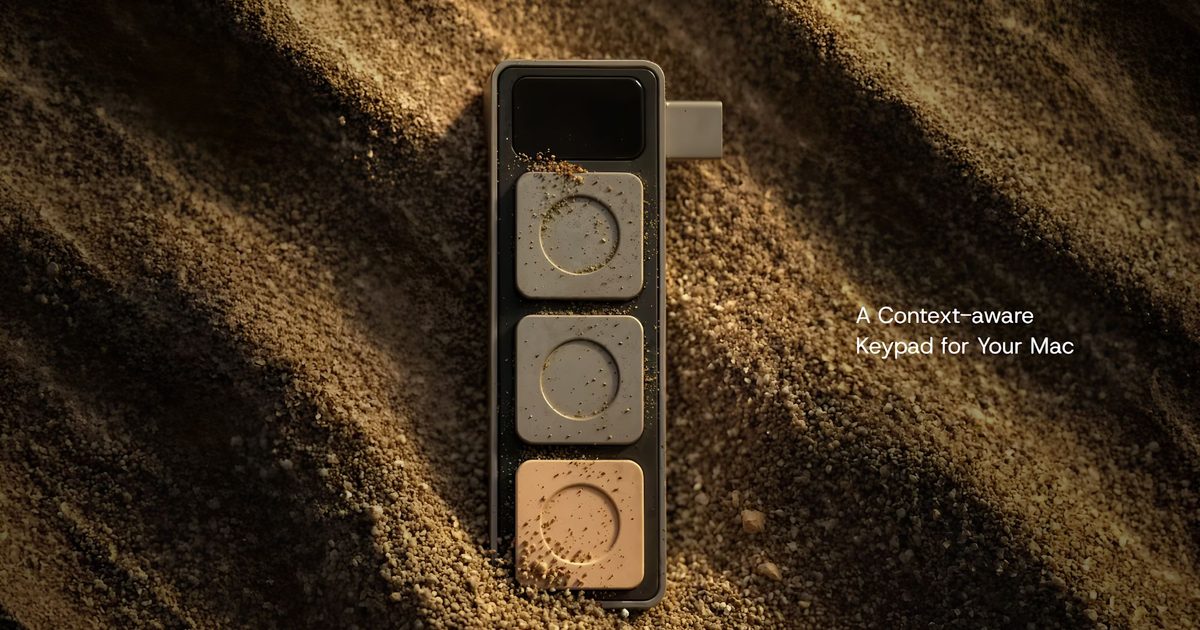
The quest to streamline human-computer interaction has taken many forms over the decades, from the keyboard and mouse to touchscreens and voice commands. Yet one persistent friction point remains: the sheer number of keyboard shortcuts users must memorize to navigate modern productivity software efficiently. A new hardware accessory from startup Project Mirage aims to address this by bringing physical, context-aware buttons to the side of a MacBook.
Called Dune, the device is a compact USB-C accessory that clips onto compatible MacBook models and offers three programmable buttons. Its key innovation lies in automatic context detection: the buttons change their function depending on which application is currently active. For instance, during a Zoom or Microsoft Teams meeting, Dune can be configured to mute the microphone, toggle the webcam, or bring the call window into focus. In a spreadsheet like Excel or Google Sheets, the same buttons can become shortcuts for copy, paste, and undo. Developers working in Visual Studio Code or using GitHub can assign actions such as commit, push, or toggle terminal.
Project Mirage designed Dune specifically for MacBooks, with a form factor that sits flush against the side of the laptop to maintain a clean, integrated look. It plugs into a USB-C port and draws power directly from the MacBook, eliminating the need for batteries or separate charging cables. The accessory is currently compatible with MacBook Air models powered by the M2 chip or newer and MacBook Pro models featuring M1 Pro processors or later, running macOS Sequoia 15 or newer.
Context-awareness and AI integration
The companion app for Dune allows users to create application-specific shortcuts or system-wide actions. Beyond simple keyboard commands, users can configure buttons to launch applications, open websites, or execute custom scripts. One of the more distinctive features is integration with Claude Desktop, the AI assistant from Anthropic. Instead of manually writing automation scripts, users can describe the shortcut they want in natural language, and Claude generates the required Python code and assigns it to a button. This makes creating custom workflows considerably more approachable, even for users without programming experience.
Additionally, the companion app integrates with calendar services to surface upcoming meetings. With a single button press, users can join a call, dismiss reminders, or send a "running late" message. This kind of calendar-aware automation is rare in physical macro keypads and positions Dune as a productivity tool that goes beyond mere key remapping.
The evolution of physical macro keypads
Dune enters a market that has seen growing interest in dedicated macro keypads and shortcut decks. Products like the Elgato Stream Deck, the Razer Tartarus, and various numpad-style programmable keyboards have carved out niches among streamers, video editors, and power users. However, most of these are standalone devices that sit on the desk beside the laptop, requiring extra space and USB ports. Dune's design, by contrast, is meant to be permanently attached to the laptop, making it portable and always available. Its slim profile and direct USB-C connection also mean less cable clutter.
Historically, context-aware input devices have been limited to high-end workstation keyboards or custom setups with complex software. For example, the Logitech MX Keys series offers app-specific profiles, but those must be switched manually. Dune's automatic detection is a step toward ambient intelligence, where the peripheral adapts to the user's current task without explicit input. This aligns with broader trends in AI-assisted productivity, where systems anticipate user needs rather than waiting for commands.
The rise of remote and hybrid work has also increased the demand for tools that simplify video conferencing. Studies show that professionals spend an average of 5 to 7 hours per week in virtual meetings, and the minor annoyances of fumbling for mute buttons or camera controls can disrupt flow. Dune's three buttons, while limited in number, are positioned to handle the most frequent actions across multiple apps.
Design philosophy and target audience
Project Mirage's decision to limit the device to three buttons might seem restrictive compared to the 12 or more buttons on a Stream Deck. However, the rationale is that fewer buttons reduce cognitive load. With automatic context switching, users don't need to remember what each button does in different apps; the device shows the function via companion app labels or on-screen overlays. This trade-off between quantity and simplicity mirrors the approach of Apple's own design principles, where minimal interfaces often win over feature-packed alternatives.
The target audience appears to be MacBook users who value portability and clean aesthetics but need more than the built-in keyboard can offer. Developers, designers, video editors, and remote workers who juggle multiple applications are prime candidates. The integration with Claude Desktop also appeals to the growing number of users who rely on AI assistants to automate repetitive tasks. By allowing natural language scripting, Dune lowers the barrier to creating personalized workflows without learning arcane programming syntax.
Pricing and competition
Dune is currently available at an introductory price of US$119, after which it will retail for US$149. This price point positions it between budget macro keypads (often around $50-$80) and premium devices like the Stream Deck XL ($249). It also competes with the Logitech Litra Glow or other camera-mounted controls, though those are not dedicated programmable keypads. The USB-C direct-attach design may justify the premium for users who prioritize portability and seamless integration.
Other niche products such as the "BT21C" or custom 3D-printed macro pads are available on platforms like Etsy, but they lack the software ecosystem and AI hooks that Dune offers. Project Mirage's companion app and Claude integration provide a modern, software-defined approach that can evolve over time with firmware updates.
Technical considerations and future potential
One challenge for any context-aware peripheral is maintaining compatibility as operating systems and applications update. Project Mirage will need to regularly update its companion app to recognize new software versions and maintain the automatic detection feature. The reliance on macOS Sequoia 15 or newer means users with older MacBooks or those who choose not to upgrade will be locked out. This could be a barrier to adoption, especially among enterprise users who often run older OS versions for stability reasons.
Another consideration is the physical security of the device. Since it plugs into a USB-C port and protrudes slightly, it could be accidentally knocked off or subject to wear from repeated insertion and removal. The company has not specified the materials or build quality, but a durable construction will be essential for daily use.
On the software front, the Claude integration opens the door to more advanced automations. Users can potentially chain multiple actions, incorporate conditional logic, or even interface with web APIs. As AI models improve, the natural language to script pipeline could become a powerful tool for non-programmers to build complex workflows without learning a programming language.
The concept of physical buttons augmented by AI intelligence mirrors broader industry trends. For example, the Flic button (a programmable Bluetooth button) and the Button by Flic have similar goals but rely on smartphones as hubs. Dune's direct laptop integration and context awareness set it apart.
Broader implications for productivity hardware
As AI-assisted productivity tools continue to expand beyond software, devices like Dune suggest hardware makers are exploring new ways to make everyday computer interactions faster and more intuitive. The success of such a product will likely depend on how quickly the community builds a library of useful configurations and how well the companion app supports user contributions. If users can share and download shortcuts for popular apps, the value of Dune multiplies.
Several startups have attempted similar concepts in the past. The "Palette" modular control deck and the "Titan One" macro pad gained niche followings but never reached mainstream adoption. Dune's advantage may be its tight integration with AI and its focus on the MacBook ecosystem, which has a loyal user base willing to invest in productivity accessories.
The gaming peripheral market has long embraced macro keys, but the productivity segment is less saturated. With remote work still prevalent and video meetings remaining a daily fixture, the demand for simple, tactile controls is unlikely to diminish. Dune's approach of melding context awareness with AI customization could pave the way for a new category of peripherals that learn from user behavior and adapt proactively.
Whether Dune ultimately finds a broad audience will depend on its reliability, the quality of its software updates, and the user community's engagement. For now, it represents a thoughtful attempt to solve a very real friction in modern computing: the friction of remembering and executing keyboard shortcuts across a shifting landscape of applications.
Project Mirage has not announced plans for a Windows version, but given the prevalence of Windows laptops in enterprise settings, a cross-platform version could significantly expand its market. The company's focus on MacBooks aligns with the creative professional demographic, but the productivity gains are universal.
As AI tools become more integrated into daily workflows, the line between hardware and software will continue to blur. Dune is a physical manifestation of that blurring, offering a tangible way to interact with digital automations. Its three buttons, powered by context and AI, may seem small, but they carry the potential to change how users think about their interactions with machines.
Source: Digital Trends News