

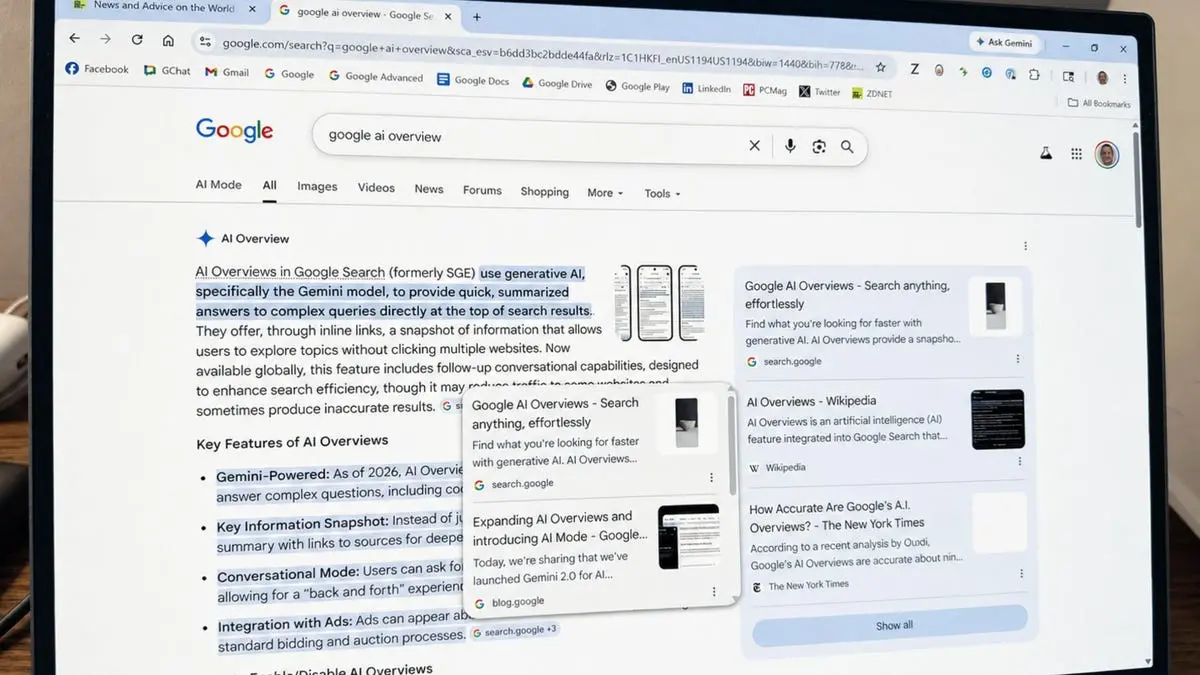
Google's AI Overviews, the feature that provides summarized answers to search queries, is getting a significant upgrade. The company announced five new features aimed at making the overviews more informative and actionable. These changes focus on incorporating human perspectives, improving source transparency, and enhancing the overall search experience.
1. View advice from other people
One of the most notable additions is a new section within AI Overviews called "Expert Advice." This section pulls in brief comments from discussion forums, social media platforms, and other online sources where individuals share their experiences and knowledge. For instance, if you search for the best food for a cat with a sensitive stomach, the overview might show remarks from cat owners on forums like Reddit or specialized pet communities. Each comment includes the name of the person or forum and a direct link to the full discussion, allowing users to dive deeper and even participate in the conversation.
Google provided an example: searching for how to photograph the northern lights could yield tips from a photography forum about exposure times and camera settings, complete with clickable links to the original thread. This feature aims to bridge the gap between technical information and real-world advice, making AI search results more relatable and practical.
2. Access your news subscriptions
For users who rely on specific news sources, Google is now highlighting links to their subscription-based articles directly in AI Overviews and AI Mode. If you have a subscription to a publication like The New York Times or The Washington Post, and that publication has enabled the feature, a label will appear next to its link in the overview. This makes it easier to access full articles behind paywalls without additional searching.
Google noted that early tests showed users were significantly more likely to click on links labeled as their subscriptions. Publishers can set up this feature through Google's Subscription Linking page, which helps them connect with subscribers who arrive via search. This update addresses a common frustration: finding relevant content but hitting a paywall without clear alternatives.
3. See links to the sources in the summary
AI can sometimes misinterpret or fabricate information, a phenomenon known as hallucination. To combat this, Google is now embedding source links directly next to the relevant text within the AI summary. Previously, users had to scroll to the bottom of the overview or click a generic "show more" link to see references. Now, if the summary mentions a fact about a bike trip through California, a link to a Pacific Coast bike touring guide might appear right next to that bullet point.
This inline linking helps users verify claims quickly and understand which source contributed to each part of the answer. For example, a summary about city green spaces might link a specific statistic to a report from an urban planning organization. This transparency builds trust and allows users to fact-check more efficiently.
4. Explore additional sources
Beyond the sources used to generate the summary, Google is adding a new section below the AI Overview that suggests other relevant articles and analyses. This "Explore more" section includes links to content that covers different angles or deeper dives into the same topic. For instance, a search about cities adding green spaces might surface a case study on Seoul's stream restoration project or a report on New York's High Line park.
This feature encourages users to broaden their understanding by exploring multiple perspectives. It also helps surface content from a variety of publishers, not just those that happened to be cited in the main summary. Google says this is part of its ongoing effort to connect users with the richness of the web.
5. Preview linked websites in the summary
To reduce uncertainty when clicking links, Google is introducing a hover preview for websites mentioned in AI Overviews. When you hover over a link, a small popup displays the site's name or title, giving you a clear idea of where the link will take you. This is especially useful for links that have generic URLs or unclear descriptions.
Google hopes this will make users more comfortable clicking on links, as they can quickly assess whether the site is likely to be credible or relevant. The preview appears rapidly and does not require loading the page. This feature aligns with broader trends in user interface design that aim to reduce friction and improve navigation.
These five features represent Google's continued investment in generative AI for search. The company emphasized that it is using techniques like query fan-out to dive deeper into the web and find the most relevant sites. By improving the visibility and helpfulness of links and showcasing original voices, Google aims to build AI in Search that helps users discover the richness of the web while connecting them directly with the sources and creators they are looking for.
The updates are rolling out gradually in English in the United States, with plans for broader availability later this year. Users can expect to see these features appear in both desktop and mobile versions of Google Search. The company is also working on similar enhancements for other languages and regions.
As AI Overviews become more integrated into daily search habits, these changes could significantly alter how people interact with search results. By prioritizing human advice and source transparency, Google is attempting to address common criticisms of AI-generated content, namely its lack of nuance and potential for inaccuracy. Whether these updates will fully satisfy users remains to be seen, but they represent a clear step toward more responsible and useful AI integration.
Source: ZDNET News