

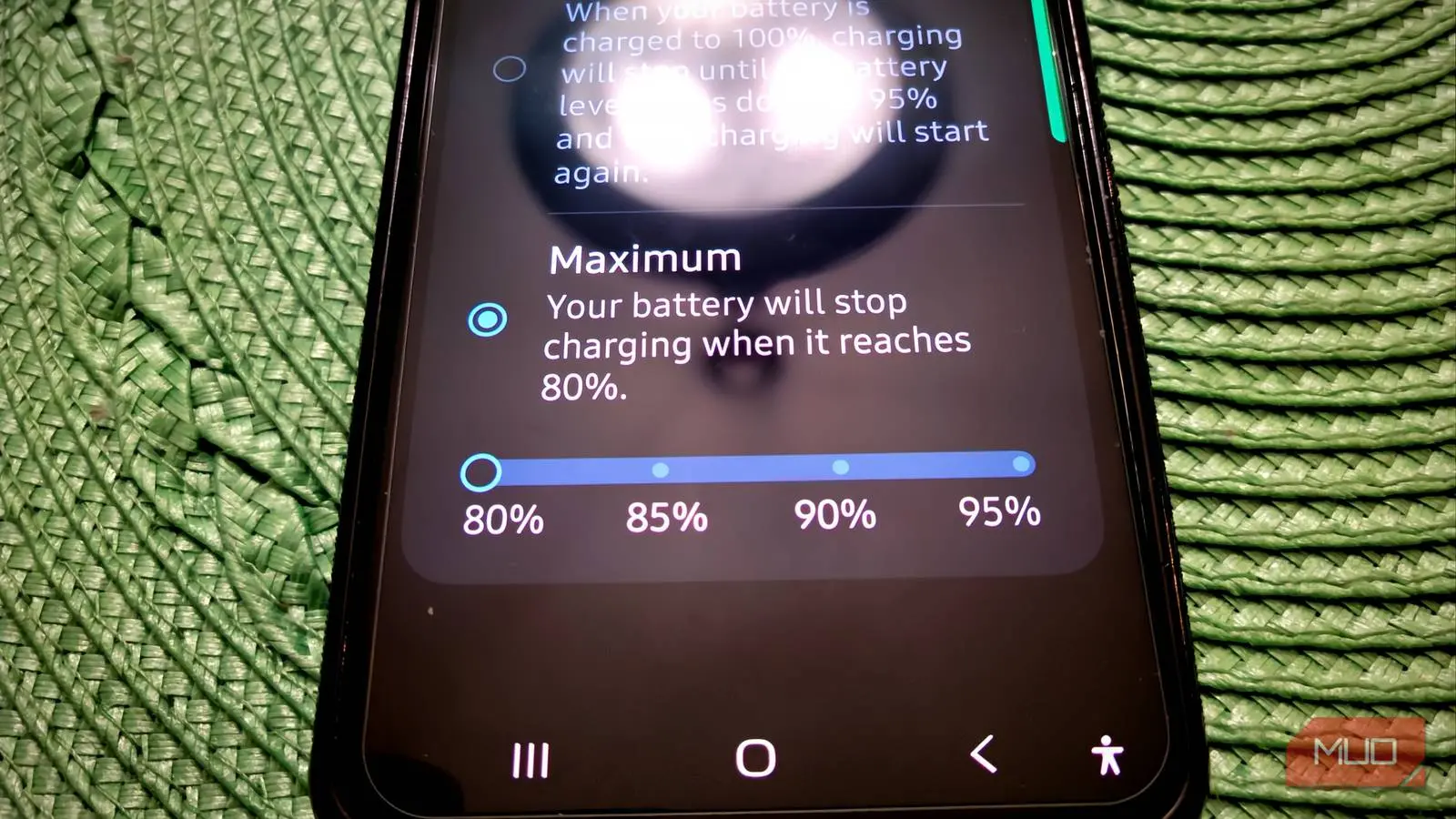
Over a year ago, I started capping my phone's battery at 80 percent, and there were plenty of days I second-guessed the decision. The real concern wasn't the theory—it was the feeling that my phone died too quickly for a practice that might not deliver tangible results. But I was wrong; the results were very real. I know this because my wife, who bought the same phone on the same day, chose not to use the same limit, and the differences are now glaring.
Stop Your Phone From Charging All the Way
A Full Battery Wears Out Much Faster
Before you do anything else with your phone, it's worth setting up one feature that will protect the battery for the long haul. No matter what you think, every lithium-ion battery is essentially a consumable component. It will degrade over time, regardless of care. The speed of that degradation depends heavily on charging habits and environmental conditions. Your phone may be a powerhouse, but its battery operates under the same chemistry as any other lithium-ion cell. Pushing it too hard for too long will steadily erode its capacity and performance.
That is why it makes sense to activate this setting early, before your charging habits can cause damage. However, it is never too late to start—I did not enable it until years after buying my phone. Taking control of how your phone charges from day one prevents a lot of wear before it starts, and your battery will last significantly longer as a result.
The key step is to go to your battery health settings and enable the option that stops charging at 80%. The idea is to keep the battery out of the high-voltage zone it enters when charged to full. Normally, charging to 100% means the battery sits between 4.20 and 4.35 volts per cell—great for runtime but harsh on the battery itself. The final stretch from 80% to 100% is the most stressful part of the charge. Lithium ions are crammed into an already near-full space, generating extra heat. Sitting at that high voltage accelerates unwanted chemical reactions inside the battery that actively reduce its lifespan. Capping at 80% sidesteps most of that voltage-driven stress. Done consistently, this can double, or even quadruple, the number of charge cycles your battery can endure.
If you have an iPhone 15 or newer running iOS 18, open Settings, go to Battery, tap Charging, and select the 80 percent charge limit option. On Android, go to Settings, then Battery, then Battery Health and Charging Optimization, and enable 'Limit to 80%.' Galaxy users can do the same through Settings, then Battery, then Battery protection, choosing the option that caps at 80%. You can set higher limits, but keep in mind—the higher the charge level, the more long-term damage you risk.
How My Phone Held Up After Five Years
You'll Have to Get Used to Charging It Mid-Day
I have been capping my phone's battery at 80% for over a year, and for a few prior years I experimented with other battery-saving settings. The adjustment is not immediate. At first, the hardest part was remembering that 80% means fully charged. Unplugging the phone and seeing it already 20% below full took some getting used to.
On busier workdays, I definitely felt the difference in available screen time by afternoon. I started keeping a charger near my desk and charging my phone much earlier than before. Previously, my phone would hit 15% by the end of the night. Now, because I top it up in the middle of the day, it still has plenty of charge at bedtime. That is an inconvenience if you forget to charge at midday. You give up that extra battery cushion, and for the first few months, it genuinely felt like I had deliberately made my phone slightly weaker.
My wife bought the exact same phone on the same day but never enabled the 80% cap. I started toggling battery settings around the second or third year. Today, her phone needs replacement: it runs hot constantly, has Wi-Fi issues, and charges much slower than mine. Mine still feels nearly new. I used to be skeptical that one setting could make such a difference, but the evidence is impossible to ignore. We use the same case type, yet her phone's back panel—where the battery sits—has heat damage and is discolored, while mine is pristine. It feels like a cheat code to extend a phone's useful life.
Running out of battery faster than expected is a real trade-off and can be annoying. But it is absolutely worth it because my phone performs as if I bought it just a year ago, even though I have owned it for five years.
You'll Need to Use Your Phone a Little Differently
Your Battery Will Still Die Eventually
I also adjusted my usage patterns to avoid unnecessary battery drain. I turn off continuous mobile data tethering, avoid GPS navigation when not driving, and only take photos or videos when I really intend to. For anyone who likes to run everything at once on their phone, this is a significant change. But I realized I did not need most of those features running all the time, and it turned into a bonus improvement in overall battery life.
I also carry a power bank occasionally (I have used it only twice), and my car has a USB-C port for charging. These extra steps help mitigate the reduced starting charge.
This Won't Save Your Battery Forever
None of this erases the fundamental limitation of lithium-ion batteries. They will degrade no matter how well you treat them. Even the most careful owner can't make a battery last a lifetime. But if you have ever replaced a phone early solely because the battery could no longer get through a day, this technique directly addresses that problem. A few weeks of adjusting your charging routine now buys you a battery that still feels like new years later. The trade-off of shorter daily runtime is a small price for years of extended performance.
Source: MakeUseOf News