

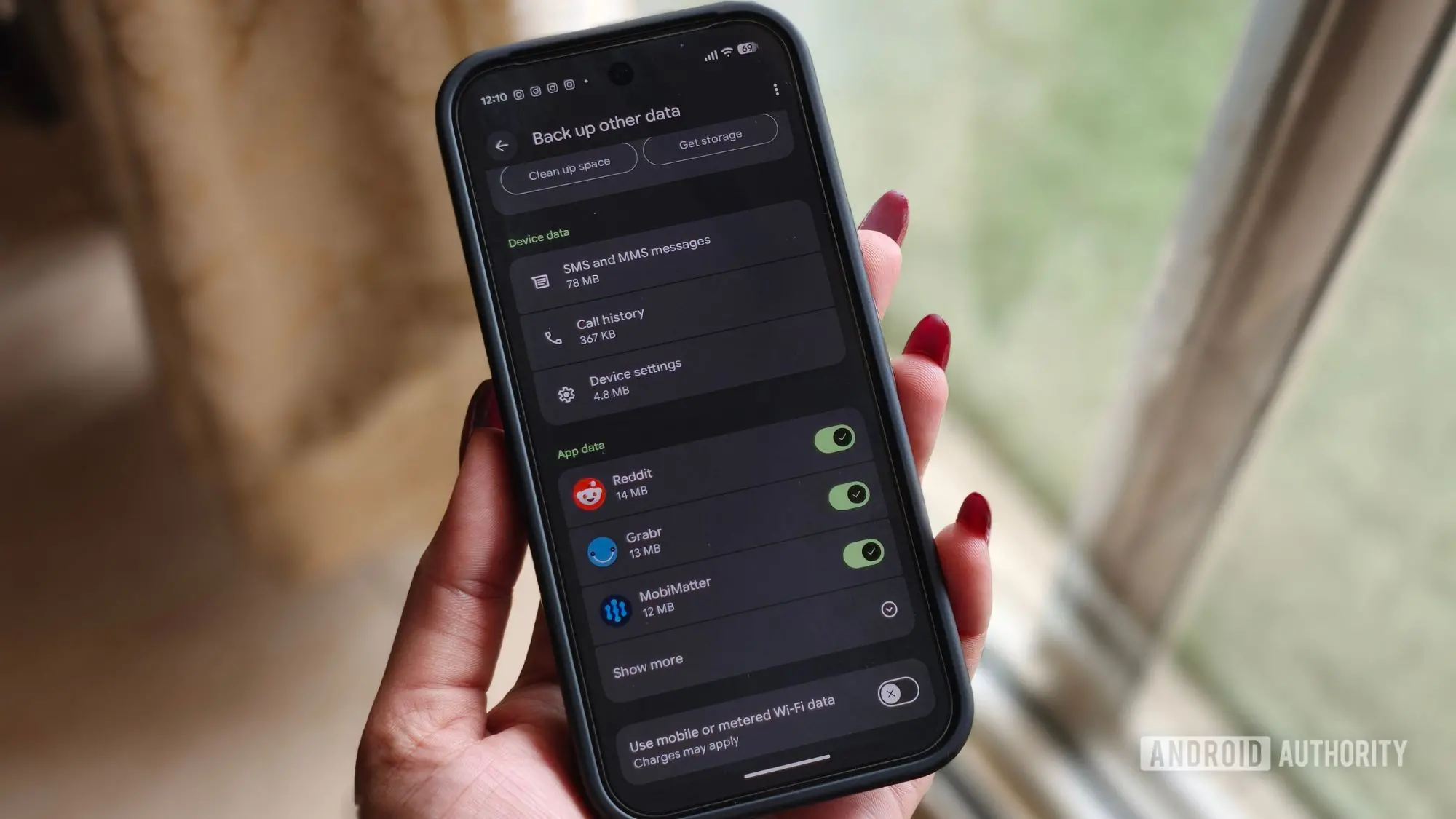
Google has announced a significant update to how Android device backups interact with your Google Account storage. Starting now, all backup data — including SMS messages, call history, and device settings — will count against your available storage quota. Previously, only multimedia messages (MMS) and Google Photos uploads were counted, while text conversations, call logs, and system settings were stored without impacting your 15GB free allocation.
What’s changing and why
The shift brings Android backups more in line with how other cloud services handle data. For years, Google offered a relatively generous loophole: most backup content didn’t consume user storage, making it easy to restore a phone without worrying about quota. However, as users increasingly rely on cloud backups for multiple devices, Google has decided to align its policy with typical industry practices. According to Google, the average backup will now use only about 40 megabytes of additional space — roughly the size of a few high-resolution photos. For the vast majority of users, this change will be barely noticeable, especially if they have ample free space or a paid Google One plan.
New controls for users
More importantly, Google is introducing granular backup toggles that let users decide exactly what gets uploaded. These options allow you to separately enable or disable backups for SMS and MMS messages, call history, and device settings. This is a long-requested feature for users who value privacy or want to minimize storage usage. For example, someone who never needs to restore old text messages can simply switch off SMS backup, saving space and preventing sensitive conversations from being stored in the cloud. On Pixel phones, these toggles are accessible via Settings > Accounts and backup > Google Backup > Other device data. The rollout has begun on Pixel devices and will gradually extend to other Android phones over the coming months.
Historical context and impact
Google’s backup system has evolved significantly since the early days of Android. Originally, backups were limited and not always reliable. With Android 8.0 Oreo, Google introduced automatic app data backups that used its cloud infrastructure without counting against user storage. This made it easy for users to switch phones and restore apps, settings, and even SMS conversations. However, the system had a notable blind spot: MMS messages containing photos or videos were always counted, leading to confusion for users who suddenly saw their storage fill up after a backup. The new policy removes that inconsistency by treating all backup data uniformly. This change affects everyone with a Google Account, though the impact varies. Users on the free 15GB tier who also store many photos, emails, and Drive files may find the additional 40MB push them over the limit. Others with large backup sets (e.g., years of call logs and thousands of messages) could see a slightly larger increase. Google estimates that even in heavy-use cases, the extra storage needed will rarely exceed 100MB.
Managing your backup storage
To avoid surprises, users should review their current backup size and adjust settings. On Android, go to Settings > Accounts and backup > Google Backup and check the backup details. The new toggles allow you to exclude specific data categories. Additionally, you can delete old backups from the Google Drive app under Backups. If you find yourself running low on space, consider upgrading to a Google One plan, which starts at 100GB for a modest monthly fee. Google One also offers additional perks like expanded photo storage and family sharing. For those who prefer not to pay, carefully managing which data is backed up can keep storage usage within the free tier.
Broader implications for users
This change highlights Google’s ongoing effort to streamline its cloud services. By making all backup data count equally, the company reduces ambiguity and simplifies user expectations. However, it also places more emphasis on storage management, especially for users with multiple devices or long backup histories. The new controls give users more agency, but they also require attention. For example, if you often switch phones and rely on restoring SMS and call history, you’ll want to keep those categories enabled. On the other hand, if you use third-party messaging apps like WhatsApp or Signal, which handle their own backups, the native SMS backup may be superfluous. Understanding these trade-offs is key to optimizing storage.
Comparison with other platforms
Apple’s iCloud backup has always counted all backup data (app data, messages, settings) against the user’s storage limit, similar to Google’s new approach. However, iCloud offers far less free storage — just 5GB — making backups a common headache for iOS users. Google’s 15GB free tier remains more generous, and the 40MB average increase is unlikely to cause major issues for most. Android users also benefit from Google Photos’ high-quality storage option, which can compress photos to save space. In contrast, Apple users must either pay for iCloud+ or manually manage their backups. Google’s decision to add granular controls also exceeds what iOS provides, where you can only toggle app-by-app backups, not specific data types.
How to check if the update has reached you
Google is rolling out the new storage policy gradually, so not everyone will see it immediately. To check, open the Google Drive app, go to the menu, and select Backups. If you see a list of your device backups with updated storage figures (showing larger sizes than before), the change is active. Alternatively, on your Android phone, navigate to Settings > Accounts and backup > Google Backup and look for the new toggles under Other device data. These toggles only appear after the policy update has been applied to your account. If they’re not visible yet, wait a few weeks — the rollout is expected to complete by mid-2025. In the meantime, no action is required; your backups will continue to work as before, but eventually the storage accounting will change.
Technical details and data management
For those curious about the numbers, each SMS message is roughly 160 bytes, while MMS messages can vary widely depending on attached media. Call history entries are small, typically under 1KB per call. Device settings, such as Wi-Fi passwords, wallpaper, and accessibility configurations, are also compact. Multiplying these across months or years of backups can add up, but 40MB is a reasonable average. Google’s engineers likely optimized the backup format to minimize overhead. Users with extensive multimedia messages (photos, videos) may see a larger impact, though MMS was already counted before. The new policy simply ensures all data types are treated equally. To manage storage proactively, users can delete old backups that are no longer needed. For example, if you have a backup from a phone you no longer own, removing it can free up gigabytes. The Google Drive app provides a clear interface for this.
This update is part of a broader trend toward making cloud services more transparent and sustainable. As users accumulate more data — from multiple devices, high-resolution photos, and large files — cloud providers must balance free offerings with operational costs. By counting backups uniformly, Google aligns incentives so that heavy users consider paid plans, while light users experience no noticeable change. The new toggles further empower users to choose their own trade-offs between convenience and storage consumption. Whether you welcome the change or view it as a subtle push toward Google One, understanding the details will help you avoid surprises and maintain control over your digital life.
Source: Android Authority News